
REVIEW · TULUM
Tulum Mayan Ruins GPS Self-Guided Walking Audio Tour
Book on Viator →Operated by Walk with Action · Bookable on Viator
Tulum ruins hit different when you control the pace. This GPS-triggered audio walk turns the site into a sequence of stories, maps, and photos you can follow at your own speed, without a group herding you along. I especially like how hands-free audio plays by your location and how you can still navigate when there’s no cell signal.
Two things I really appreciate: the tour gives you a suggested route with audio, text, images, and map, so you’re not wandering blind, and it’s built for repeat use with new lifetime access (no expiry). One possible drawback is that the experience depends on your phone’s location permissions—if location is off or GPS is spotty, some audio cues may not trigger automatically.
In This Review
- Key highlights you’ll notice fast
- What You’re Getting at Tulum: GPS Self-Guided Audio Instead of a Group Herd
- Price and Value: How $9.99 Changes the Way You See the Ruins
- Before You Go: Setup That Makes or Breaks GPS Audio
- Entering the Site: The Parking-Lot Start and How the Walk Flows
- Stop-by-Stop: What Each Area Teaches You to Look For
- Stop 1: The Tulum Ruins entrance path
- Stop 2: Casa Cenote
- Stop 3: Plataforma Funeraria (funeral platform)
- Stop 4: El Castillo
- Stop 5: Temple of the Frescoes
- Stop 6: Temple of the Wind (cliff warning temple)
- Stop 7: Casa del Chultún (rainwater harvesting)
- Stop 8: Templo del Dios del Viento (whistling wind-warning holes)
- Stop 9: Great Platform / Casa del Noreste (Northwest House)
- Stop 10: Templo Maya (Tulum Playa) and the Descending God
- How Reliable Is the App: GPS Triggers, Autoplay, and What If It Glitches
- The Real Logistics You’ll Care About: Time, Heat, and Battery
- Support and Flexibility: Starting, Pausing, and Getting Help
- Who Should Book This Audio Tour (and Who Might Skip It)
- Should You Book This Tulum Mayan Ruins GPS Audio Tour?
- FAQ
- Does the $9.99 price include entry tickets to the ruins?
- How long is the Tulum Mayan Ruins GPS self-guided walking audio tour?
- Does the tour work without cell service?
- Do I need headphones?
- How do I start the tour once I’m onsite?
- What should I do if the audio doesn’t play at the right time?
- Is the tour available after the purchase?
- Can I cancel for a full refund?
Key highlights you’ll notice fast
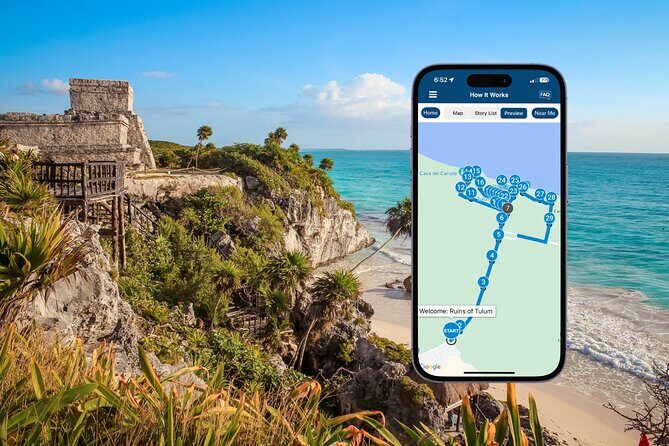
- GPS-driven, location-based audio so stories start as you reach each area
- Offline maps so you can keep walking even with dead or weak signal
- Suggested route with 28+ audio stories covering major structures without guesswork
- A practical start at the ruins’ parking-lot entrance with a clear walking path
- Headphones make it much better, and it helps if your battery is ready
What You’re Getting at Tulum: GPS Self-Guided Audio Instead of a Group Herd

This is a self-guided walking tour of Ruinas de Tulum designed around your phone’s GPS. You download the Action’s Tour Guide App, enter a password you receive by email/text, then open the tour onsite so the audio starts when you reach story points.
Instead of one long talk, you get a sequence of short, place-based stories. That matters in Tulum because you’re walking between sun, shade, viewpoints, and stonework details where context helps. The “route + audio” combo also reduces the stress of figuring out what you’re actually looking at.
And yes, you’ll still be walking like you’re at a major archaeological site. The tour path is over 1.5 miles, and the full experience takes about 1–2 hours depending on how often you stop for photos and breaks.
You can also read our reviews of more walking tours in Tulum



Price and Value: How $9.99 Changes the Way You See the Ruins
At $9.99 per person, the value is mostly about control. You’re paying for a self-paced way to get explanations right where the stones are, without adding cost for a full guided tour.
This also works if you like to pause and look longer at one structure. The app explicitly supports starting anytime, pausing anytime, and skipping what doesn’t interest you. That flexibility is hard to buy with a standard guided tour where your time gets scheduled for you.
Important note: admission tickets are not included. The audio tour helps you understand what you’re seeing, but you still need whatever entry method the site requires on the day you go. If you show up thinking the $9.99 covers admission, you’ll be disappointed—some people have run into this confusion and ended up paying again.
Before You Go: Setup That Makes or Breaks GPS Audio
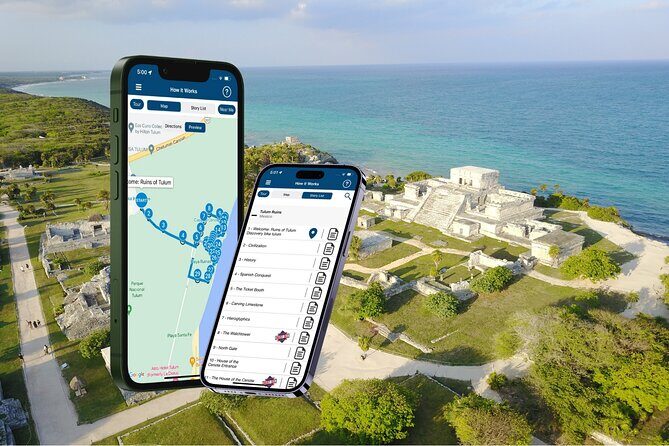
For this kind of GPS tour, your phone setup matters more than people expect. You should:
- Use an iPhone with iOS 15+ or Android 9+ (or an iPad/tablet with GPS and cellular connectivity).
- Download the tour while you have strong Wi‑Fi/cellular, because it then works offline.
- Bring headphones/earbuds for the best experience, since the audio is meant for listening hands-free.
One useful real-world tip: download on Wi‑Fi when you can, then manage your phone so it doesn’t run your battery down while walking. A power bank is a smart move in heat-heavy locations like Tulum.
Also watch your location permission. When location access is not allowed, GPS-based audio can fail to trigger. That’s the kind of problem that makes an otherwise good tour feel buggy.
Entering the Site: The Parking-Lot Start and How the Walk Flows

Your tour starts at Ruinas de Tulum, Zona Hotelera Tulum, 77765 Q.R., Mexico, and it ends back at the meeting point. You’re not waiting for a person—no pickup, no timed group.
The start is right near the parking area. From there, you follow the path to the ruins, and you enter the first story point. After that, the app is designed to move you story-to-story as you walk and reach each GPS location.
Because it’s location-triggered, the route works best if you stick to the tour path and walking speed the app expects. If you wander off the suggested line, you might not hit the audio cue spots right away.
Stop-by-Stop: What Each Area Teaches You to Look For
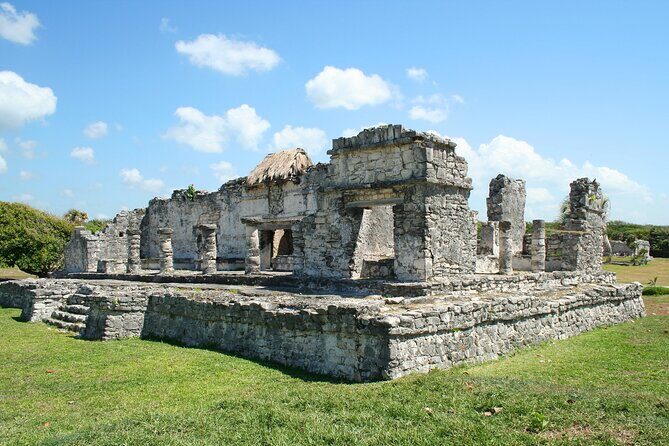
Here’s the heart of the experience: 10 major story stops tied to structures and viewpoints. The app’s timing is short at each one (about 5 minutes each), but your time will stretch if you take photos or linger.
You can also read our reviews of more guided tours in Tulum





Stop 1: The Tulum Ruins entrance path
You kick off right next to the parking lot, where the trail to the ruins begins. The benefit of starting there is simple: you get oriented early, before you’re surrounded by stone and sun.
If you want the best flow, start the tour only after you’re at the first story point. Don’t try to “half start” while you’re still walking around looking for the entrance—GPS cues work best when the tour is already open and ready.
Stop 2: Casa Cenote
Casa Cenote is the first big landmark you reach. The story leads you through the entrance into a different kind of Tulum space—more enclosed and atmospheric than the open plazas.
This stop is a good reminder that the ruins weren’t just monuments. They were part of a living landscape, with water and architecture doing jobs that still feel clever.
Stop 3: Plataforma Funeraria (funeral platform)
To your left sits the Plataforma Funeraria, and the audio connects it to Mayan funeral rites. You’ll hear about the practice of placing maize in a body’s mouth—both a symbolic and practical idea tied to life and rebirth.
This is one of those stops where audio can transform what looks like a platform into something meaningful. If you’re new to Mayan history, this is a strong “set your brain” moment.
Admission note: the app flags this stop as ticket free.
Stop 4: El Castillo
You can’t miss El Castillo. It rises about 40 feet and is associated with the Mayan god Kukulkan. The audio also points out that it sits on the highest elevation in Tulum, which makes it feel even more imposing as you climb toward it.
Practical tip: El Castillo is also a natural photo magnet. If you want clear pictures, consider timing your stop so you’re not fighting the harshest overhead light.
Admission note: the app lists this stop as not included for admission.
Stop 5: Temple of the Frescoes
Next comes the Temple of the Frescoes, known for detailed paintings of Mayan deities. Even if you’re standing near areas where details are worn down, the audio helps you understand what you’d be looking for.
This stop is great for people who like art and symbolism. It also helps you notice that Tulum wasn’t only about big architecture—it was also about specific depictions and meaning.
Admission note: the app lists it as not included.
Stop 6: Temple of the Wind (cliff warning temple)
Then you hit one of the most interesting structures: the Temple of the Wind. The audio explains its cliff placement and what it was meant to do—serve as a warning about storms.
The round platforms you see here are part of the story’s explanation: it’s framed as a temple connected to the Wind God. This is the kind of stop where the architecture starts to feel functional instead of purely ceremonial.
Admission note: listed as not included for admission.
Stop 7: Casa del Chultún (rainwater harvesting)
The House of Chultun (Casa del Chultún) is where Mayan engineering gets very tangible. The audio focuses on rainwater harvesting and how the building design helps route rainwater into a reservoir.
If you’ve only ever heard “ruins” as a word for history, this stop re-trains your thinking. You’re looking at a system built to solve an everyday problem: fresh water.
Admission note: the app flags this stop as ticket free.
Stop 8: Templo del Dios del Viento (whistling wind-warning holes)
This stop zooms in on the temple’s holes. When hurricane-force Caribbean winds blow, the holes start whistling—turning the building into an efficient warning system.
It’s a clever concept, and the audio makes it easier to imagine what the structure was doing in real life. If you like cause-and-effect stories, don’t rush this one.
Admission note: the app flags it as ticket free.
Stop 9: Great Platform / Casa del Noreste (Northwest House)
You continue past the platform to the house ruins on the right, connected to Casa del Noreste, also called the Northwest House. The story frames it as a home for important members of Mayan society.
This is a quieter stop than El Castillo, but it helps you understand that the site wasn’t just dramatic temples. There were residences and status built into the layout.
Admission note: flagged as ticket free.
Stop 10: Templo Maya (Tulum Playa) and the Descending God
The final stop highlights the temple linked to the Descending God—often associated with Venus. The audio points out niche figurines on the facade and a stucco figure on the western wall that connects to the temple’s name as the Temple of the Descending God.
This wrap-up matters because it ties together the visual details you might have missed earlier. When you finish here, you’re less likely to think of Tulum as “random ruins” and more likely to see a designed religious and artistic plan.
Admission note: flagged as ticket free.
How Reliable Is the App: GPS Triggers, Autoplay, and What If It Glitches

The strongest version of this tour runs like a charm: you walk, and the audio plays automatically based on your location. One big upside is that you can keep moving without constantly pressing play.
But GPS tours come with a reality check. If the app can’t confirm your location—because location permission is blocked, or you’re slightly off the expected route—audio might not trigger. A practical workaround is built in: you can use the tour’s list to tap a section manually when autoplay is late or missing.
In other words, don’t panic if a story doesn’t start exactly when you arrive. Check your position, step a little closer, and if needed choose the story manually. That keeps the experience from turning into frustration.
Also, I like that the audio includes extra photos and visuals that help you keep track of what each area is supposed to represent. When you’re walking, you need those quick visual reminders.
The Real Logistics You’ll Care About: Time, Heat, and Battery

This is a walking tour that can take 1–2 hours. It’s short enough to fit into a day plan, but long enough that comfort matters.
In Tulum heat, I’d plan for:
- Short shade stops every 15–20 minutes
- A water break near major landmarks
- A dead-battery prevention plan (power bank if your phone battery is anything less than strong)
Headphones are highly recommended for the experience. If you’re sharing with someone, you might find it easier to split and share one tour audio via one device, but the simplest setup is one person per phone.
One more practical note: since it’s “offline after download,” you should download first on a good connection. Then you’re not wrestling with roaming costs or signal dropouts mid-walk.
Support and Flexibility: Starting, Pausing, and Getting Help

This is built to be self-guided, so you can start and pause whenever you want. That flexibility is great if you’re timing around tours, crowds, or just how your feet feel that day.
If something goes wrong, support is available by email, chat, and call. That matters for a GPS tour because most issues are solvable once someone knows what your phone is doing.
Also, you get new lifetime access, no expiry, meaning you can use it anytime on any trip. You can even listen at home as a “pre-visit warm-up” or as a way to remember what you saw later.
Who Should Book This Audio Tour (and Who Might Skip It)
This tour is a good match if you want:
- A low-cost way to learn the site without a full guide price
- Flexibility to go slow, stop often, and take breaks
- A GPS-guided route that helps you keep your orientation
You might prefer a human guide instead if:
- You know you don’t do well with app-based GPS
- You want a live Q&A on history, myths, and context beyond what an audio script covers
- You’re traveling with a group that strongly wants one shared interpretation and pacing
For many people, this is the sweet spot: get structured stories, walk at your own speed, and still spend the rest of your time in Tulum how you want.
Should You Book This Tulum Mayan Ruins GPS Audio Tour?
I’d book it if you’re the type of traveler who likes learning in small chunks while you walk. At $9.99, it’s a smart “value for understanding” purchase—especially if you download it properly and keep location permissions turned on.
Skip it (or at least plan carefully) if you hate phone-based navigation or you’re worried about battery life and permissions. The app can be excellent, but GPS audio only works well when your phone is ready to track your location.
If you want an easy win: download on Wi‑Fi, carry a power bank, bring headphones, and stick close to the suggested route so the autoplay cues land on time.
FAQ
Does the $9.99 price include entry tickets to the ruins?
No. The audio tour is separate from admission. Entry tickets or passes are not included, so you’ll need whatever admission is required at the site.
How long is the Tulum Mayan Ruins GPS self-guided walking audio tour?
It takes about 1–2 hours to complete and covers a route that’s over 1.5 miles long.
Does the tour work without cell service?
Yes. It includes offline maps, so it works without cellular or Wi‑Fi after you download the tour.
Do I need headphones?
Headphones/earbuds are strongly recommended for the best experience since the stories are audio-based.
How do I start the tour once I’m onsite?
After booking, you’ll get email/text setup instructions with a password. Once you’re at the ruins, open the Action’s Tour Guide App and launch the tour. Then enter the first story point so the audio begins automatically.
What should I do if the audio doesn’t play at the right time?
First, make sure your phone location permission is allowed. If autoplay doesn’t trigger, you can tap and choose the story from the tour list and continue from there.
Is the tour available after the purchase?
Yes. The tour has new lifetime access with no expiry, so you can use it on any trip as many times as you want.
Can I cancel for a full refund?
Yes, you can cancel for a full refund if you cancel at least 24 hours before the experience start time.
You Might Also Enjoy



More Walking Tours in Tulum

More Tours in Tulum





More Tour Reviews in Tulum
- Selva Maya Eco Adventure Park: Ziplining, Hanging Bridges, Rappelling and Cenote
★ 5.0 · 1,057 reviews